
SoOoOoOoOoOooo you’re still using the password at the back of your modem or on that little bitty piece of paper?? Do you even know how to scan the paper yourself?? Like really, do you?!?! Don’t you worry. I have the simplest steps you can follow to get that braffings101 or kinguplike11 or hotgirlsumma#1 passwords you’ve always dreamed of having, but too lazy to check with Flow on how to get them.
“Changing your FLOW modem’s password has never been easier“
Follow the easy steps below
1, Ensure your device is connected via wireless to the internet from the modem.
2.Enter the URL 192.168.0.1 in the address bar.
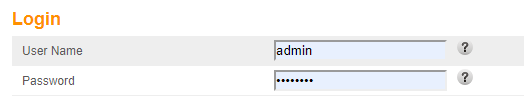
3. User Name = admin; Password = password; Click Apply.
4. Click Basic Setup to the left, and look for Wireless Network Name.

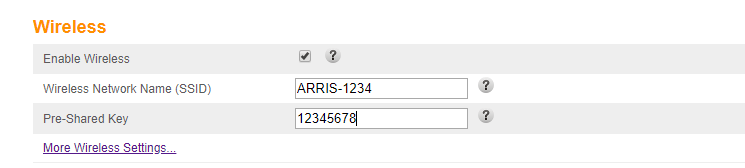
5. For Wireless Network Name your modem’s name should be there (If not, enter it). Enter your new password where the Pre-Shared Key box is; Click Apply.
6. Voila, you’re done! (you can do this to change it from any password on your modem)
PS. Remember to change the password on ALL devices that were connected with the old password.

